User Guide & Documentation

How to Use Netball Live

Comprehensive visual walkthrough and interactive guide for Spectators, Match Scorers, Tournament Organizers, and INF Analytics users.

1. Following Live Scores (Public Spectators & Fans)

Real-time match tracking, tournament filtering, and live game telemetry

Key Features & Actions

1
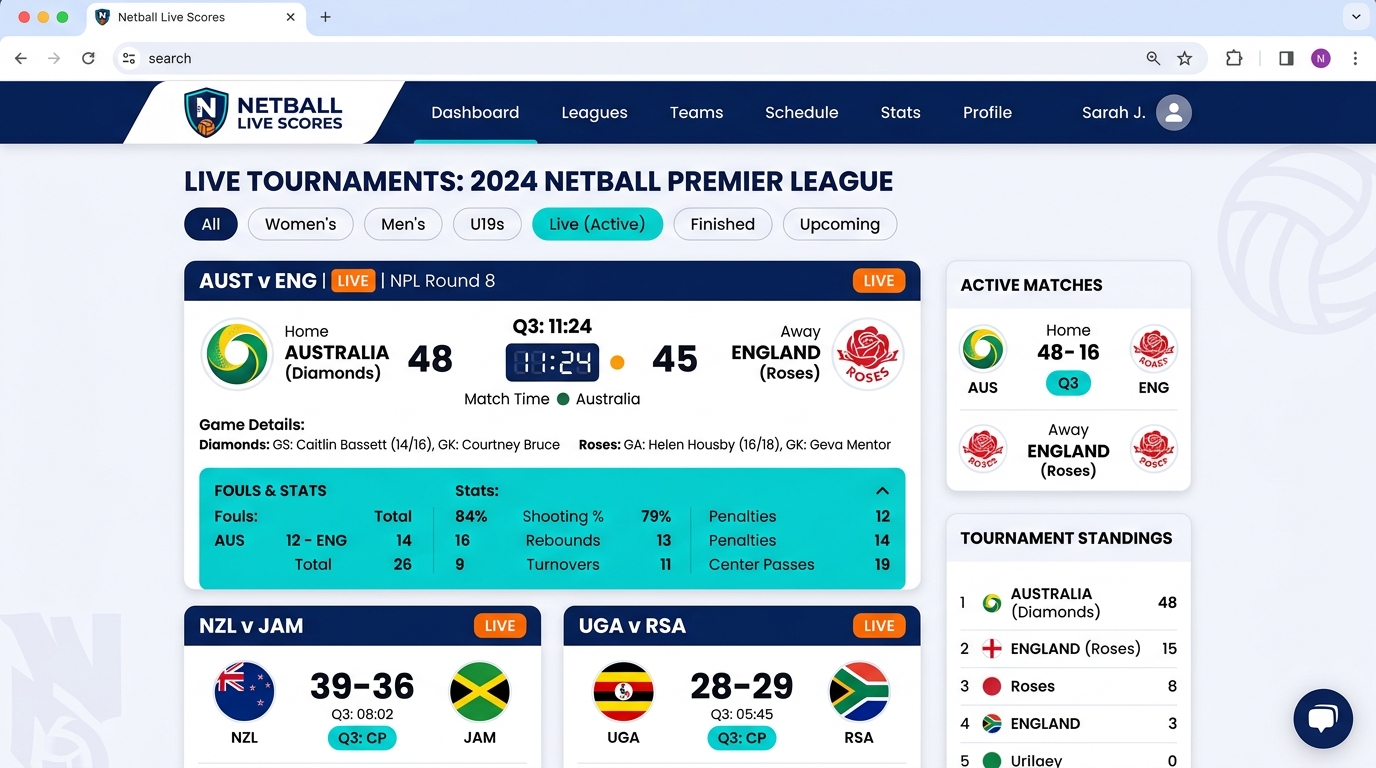
Active Live Tournaments Bar Filter instantly by clicking tournament chips at the top to only follow matches from your preferred league or cup.
2
Live & Paused Feeds Matches in progress refresh automatically without reloading page via background HTMX stream.
3
Center Pass & Timing Pill View which squad has the active Center Pass (🏐 CP) and next center pass, plus high-precision countdown timers.
4
Collapsible Foul & Stats Drawer Click the Stats button on any match card to reveal Contact, Obstruction, Held Ball, Interceptions (INT), and Assists (AST).
Pro-Tip: Use the display controls in the footer to toggle Dark Mode, Ocean, Forest, or Sepia themes for comfortable viewing in any stadium environment.
Live Scores and Tournament Filter Screenshot
Public Scoreboard & Live Tournaments Hub Real-time Stream
Instant Filter Center Pass Indicator Foul Telemetry Quarter Progression

2. Match Scorer Console (Table Officials & Scorers)

Official scoring desk, digital match clock, foul logging, and player substitutions

Scorer Workflow

1
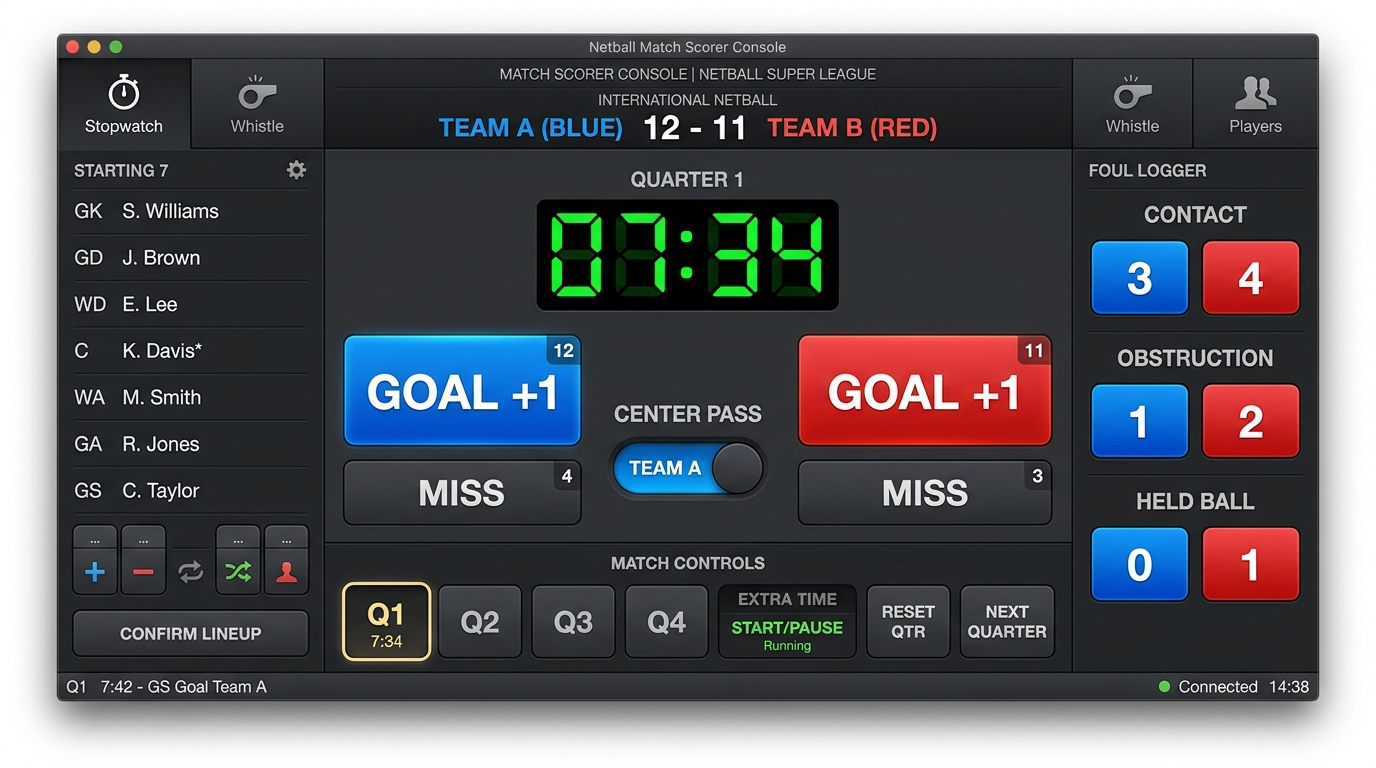
Starting 7 Lineup Confirmation Assign GS, GA, WA, C, WD, GD, GK before quarter kickoff. The active GS/GA are auto-selected for scoring buttons.
2
Match Clock & Quarter Flow Hit Start Clock to begin countdown. Clock can be paused for injury time or reset if whistle blows.
3
1-Click Goal & Center Pass Auto-Flip Click Goal +1 to log goals. Center Pass alternates automatically according to INF World Netball rulebook.
4
Fouls, Cards & Defensive Stats Log Contact, Obstruction, Held Ball, and defensive stats (INT, DEFL, REB) in real-time with instant telemetry broadcast.
Extra Time Support: In knockout ties, the console automatically unlocks Extra Time (2x 7min halves) with golden-goal sudden-death tracking.
Match Scorer Console Interface Screenshot
Official Match Scorer Desk Table Official Console
Precision LED Timer Auto Center Pass Switch Foul Logging Desk Sub & Position Manager

3. Tournament & League Command Center (Organizers & Staff)

Create Knockout brackets, Round-Robin leagues, manage team rosters, and auto-generate fixtures

Tournament Setup in 3 Steps

1
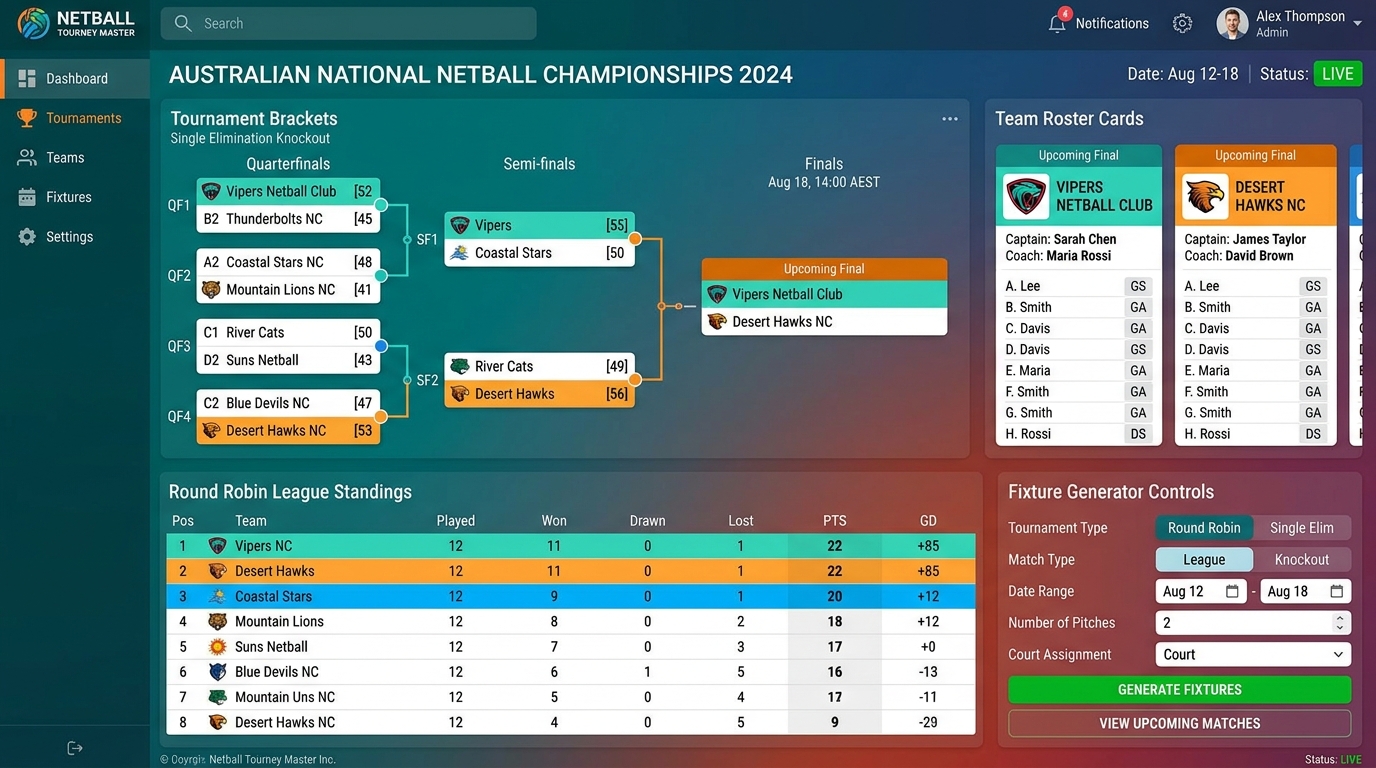
Create Tournament & Format Choose Knockout (Single Elimination) or League (Round-Robin). Set target team count (4, 8, 16) and quarter length.
2
Add Teams & Seed Order Enroll registered teams or create new squads. Arrange team seeding directly on the tournament board.
3
Auto-Generate Fixtures & Winner Progression Click Generate Fixtures. Knockout winners automatically advance to Semi-Final and Final slots as matches finish!
League Ladders: Standings calculate Played, Won, Drawn, Lost, Goals For (GF), Goals Against (GA), Goal Difference (GD), and Points automatically.
Tournament Management & Brackets Screenshot
Knockout Brackets & Round Robin Ladders Auto-Advancement
Knockout Bracket Tree Round Robin Ladders 1-Click Fixture Generator Roster Management

4. World Netball (INF) Official Analytics & Reports

Publication-ready INF Official Scoresheets, Player Performance Radars, and 1-Click PDF exports

Analytics Suite

1
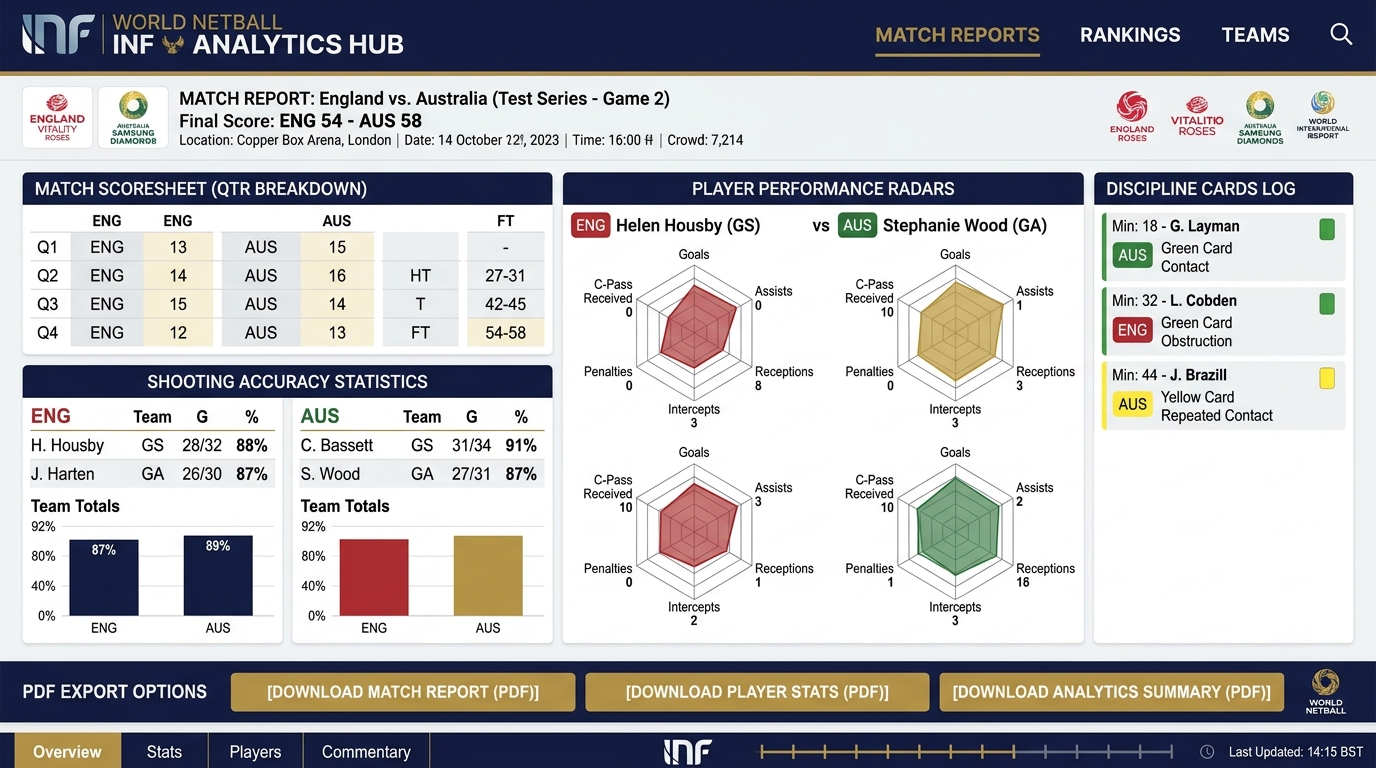
INF Official Match Scoresheets Full quarter-by-quarter scoring breakdown, goal progression timeline, team shooting %, and official card history.
2
Publication PDF Exports Generate certified PDF match reports and player dossiers formatted to International Netball Federation standards.
3
Golden Bib & Defensive MVPs Automated leaderboards for top goal scorers (GS/GA), interception masters (GD/GK), and playmakers (WA/C).
Instant PDF: Open any finished match report and click Download Official PDF to print or email game sheets immediately.
INF Netball Analytics Hub and Reports Screenshot
INF Scoresheets, Radars & PDF Exports World Netball Standard
Official INF Scoresheet 1-Click PDF Downloads Player Radar Metrics Season Leaderboards

5. Quick Cheatsheet & Frequently Asked Questions

Rules reference, role shortcuts, and common operational questions
How does the Center Pass alternate?

Center Pass alternates after every goal scored. If a quarter ends, the team entitled to the next center pass retains it for the start of the next quarter. The system handles this automatically.

What happens in a Knockout tie?

When regular quarters end in a draw during a Knockout match, click Extra Time on the Scorer console. Two 7-minute halves will be initialized with automated team advance upon completion.

Who can score matches?

Users with Scorer or Staff permissions can log into the Scorer Console. Spectators can follow live scores in read-only mode without logging in.

How do I switch themes & font sizes?

Use the bottom-right footer toolbar to switch between Light, Dark, Ocean, Forest, Purple Night, or Sepia, or adjust text size (A− / A / A+).